
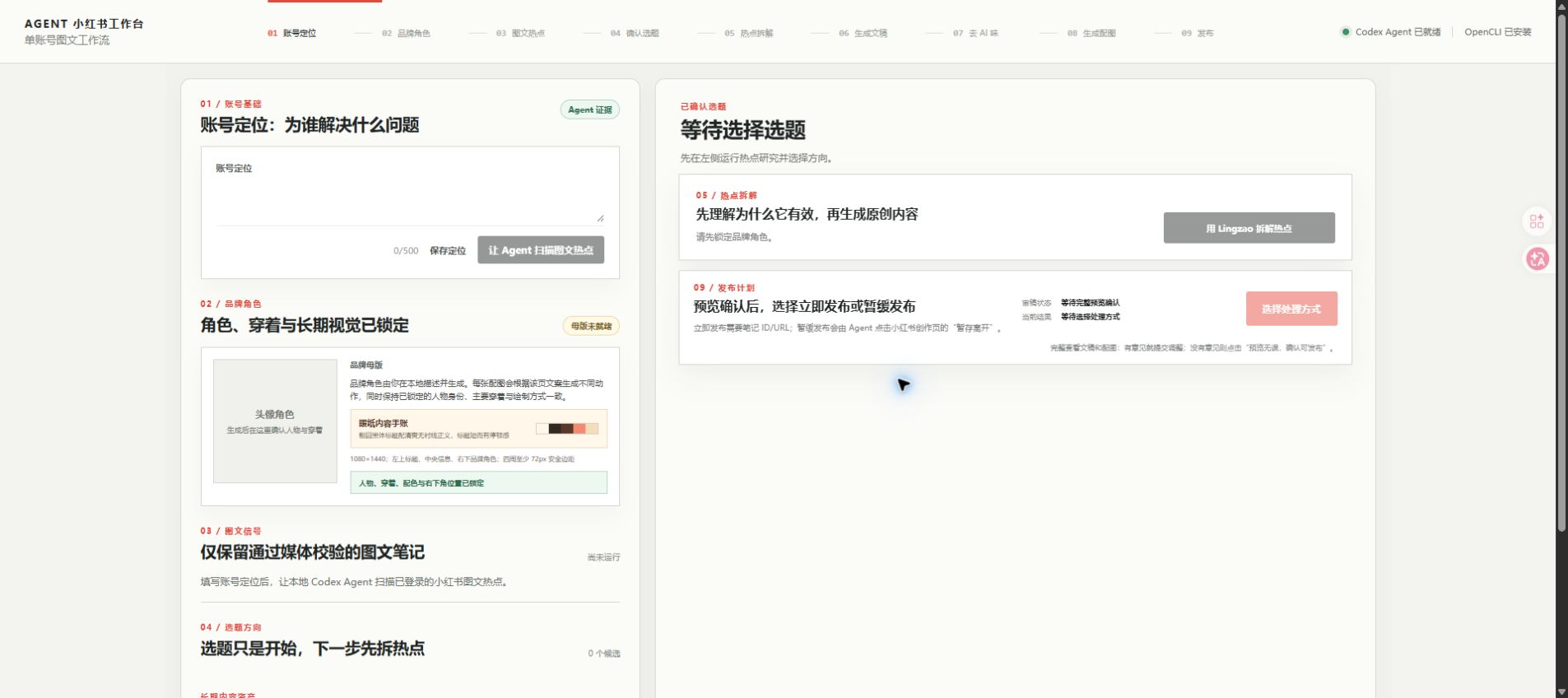
THE PROBLEM
热点很多,但真正困难的是把它变成自己的内容。
小红书图文创作经常卡在账号调性、热点取舍、原创边界和配图一致性之间。这个工作台把过程拆成可检查、可编辑、可暂停的步骤,并让不同账号的数据彼此隔离。
它不是小红书官方产品,不接入第三方模型 API,也不托管账号数据。Codex Agent 在用户自己的本地环境和浏览器会话中完成推理与研究。
THE PROBLEM
Finding trends is easy. Turning them into your own consistent content is not.
The workbench separates account positioning, research, originality boundaries, writing, and visual consistency into editable steps. Data for different content accounts remains isolated.
This is not an official Xiaohongshu product. It does not host account data or call a bundled third-party model API; Codex works in the user's own local environment and browser session.
CONTROLLED WORKFLOW
从账号定位开始,到发布前的最后一次确认。
- 选择或新建内容账号定位、品牌、热点、稿件、输出和故事线各自隔离。
- 研究本账号垂类热点共享浏览器研究会话,只缓存已验证的图文内容和互动数据。
- 形成 5 个可编辑选题结合已经标记发布的主题,保持内容故事线连续。
- 拆解结构,不复制作品提取标题、信息节奏和表达机制,不复制原句、经历、图片或版式。
- 生成并编辑文稿与配图保留初稿和去 AI 味版本,按需生成 1–6 张品牌配图。
- 完整预览并人工决定未绑定账号时只确认产出;绑定后才可选择发布或暂存。
CONTROLLED WORKFLOW
From account positioning to the final decision before publishing.
- Select or create an accountKeep positioning, brand, research, drafts, output, and story line isolated.
- Research niche-specific trendsUse a shared browser research session while caching only verified image posts and metrics.
- Create five editable topicsUse manually marked published topics to keep the account narrative continuous.
- Extract structure, not contentLearn mechanisms without copying sentences, stories, images, or layouts.
- Write and create visualsEdit both the raw and polished draft, then generate 1–6 on-brand images.
- Preview and decideNo publish action occurs without the user reviewing the complete result.
CORE CAPABILITIES
为持续运营设计,而不是只生成一篇笔记。
切换账号不会共享定位、热点、稿件或故事线。
排除视频、缺失互动指标或无法确认媒体类型的内容。
迁移结构与机制,不复刻具体作品。
锁定可辨识特征和绘制方式,保持一组图片一致。
每一轮文稿和图片都写入独立输出版本。
只有获得可验证笔记 ID 或 URL 才记录为发布成功。
CORE CAPABILITIES
Built for sustained operation, not one generated post.
Positioning, trends, drafts, output, and story lines never leak across accounts.
Exclude video, missing metrics, and unverified media types.
Transfer structure and mechanisms without copying a specific work.
Lock recognizable features and rendering rules across a visual series.
Store every writing and image run as its own output version.
Count success only when a verifiable post ID or URL exists.
REAL PRODUCT PROOF
完整工作台的真实运行,不是营销样机。
录屏展示账号定位、研究、选题与内容工作区的实际交互。页面只使用仓库中的真实界面素材。
REAL PRODUCT PROOF
The real workbench in motion, not a marketing mockup.
The recording shows actual interactions across account positioning, research, topics, and content workspaces.
RUNTIME REQUIREMENTS
安装包交付工作台,登录态和执行环境由用户自己掌握。
| 随项目提供 | 用户需要准备 |
|---|---|
| 本地前后端、Agent 编排、输出 schema、预览与发布守卫 | Node.js、Git、Codex CLI |
| 热点拆解、中文润色与浏览器 Skill | Chrome、OpenCLI Browser Bridge、自己的登录会话 |
| 项目 Logo、文档、测试与公开依赖清单 | 本地生成的稿件、图片、账号数据与浏览器数据 |
Codex CLI、Chrome、扩展和登录态不会被打进仓库或安装包。
RUNTIME REQUIREMENTS
The package delivers the workbench; the user owns the execution environment and login state.
| Included | User provides |
|---|---|
| Local app, agent orchestration, schemas, preview, and publish guards | Node.js, Git, and Codex CLI |
| Research, writing, and browser skills | Chrome, OpenCLI Browser Bridge, and the user's own login session |
| Logo, documentation, tests, and dependency manifest | Locally generated drafts, images, account data, and browser data |
Codex CLI, Chrome, extensions, and login state are never bundled into the repository or installer.
PRIVACY AND PUBLISHING
公开仓库从空白工作区开始,发布永远需要用户确认。
- 公开代码不含账号定位、热点 URL、原始笔记、评论、稿件、图片、日志或登录信息。
- 工作台不读取、复制或落盘 Cookie、密码和平台 API Key。
- 发布账号默认未绑定,必须由用户在当前浏览器会话手动切换并启用。
- “暂缓发布”只允许暂存离开,不会误触发布。
- 只在用户手动标记“已发布”后,才更新当前账号的故事线。
PRIVACY AND PUBLISHING
The public repository starts empty, and publishing always requires the user.
- No account positioning, source posts, comments, drafts, images, logs, or credentials are included.
- The workbench does not read, copy, or persist cookies, passwords, or platform API keys.
- Publishing is disabled until the user selects and explicitly enables the target account.
- Save-for-later cannot silently become a publish action.
- The account story line updates only after a manual published mark.
INSTALL
先安装桌面工作台,再连接自己的 Codex 与浏览器。
从 Releases 下载 Agent-XHS-Workbench-Setup 安装程序。
v0.2.1 提供未签名、未公证的 DMG 与 ZIP,首次启动需要手动确认。
codex --version
npm install
npm run setup
npm run dev
INSTALL
Install the desktop workbench, then connect your own Codex and browser.
Download the Agent-XHS-Workbench-Setup installer from Releases.
Version 0.2.1 provides unsigned, unnotarized DMG and ZIP packages.
codex --version
npm install
npm run setup
npm run dev
FREQUENTLY ASKED QUESTIONS
常见问题与核心特性答疑
它是用来批量制造低质营销垃圾笔记的吗?与竞品有何不同?
恰恰相反。它的设计原则是“原创拆解与发布保护”。工作台只学习高赞笔记的叙事结构与信息节奏,严禁复制原句、图片或版式;且每个账号数据严格物理隔离。系统不设置“一键全自动群发”,每一篇笔记都必须经过人工完整预览与最终确认。
账号安全如何保障?是否会封号?
工作台完全遵循本地环境执行原则,不托管密码,不抓取平台 Cookie,通过用户自己在 Chrome 中的正常浏览器会话运行,没有任何外挂或协议逆向风险。
如何保持一个账号发布的内容风格和图片一致?
每个账号均拥有独立的定位配置文件(人设、受众、视觉调性规则)。配图生成时会锁定核心品牌视觉特征与绘制提示词模版,保证同一篇笔记内 1-6 张配图在色调、画风和主体上高度连贯统一。
FREQUENTLY ASKED QUESTIONS
Frequently Asked Questions
Is this tool meant for mass-producing low-quality spam posts?
No. Its core philosophy is structural learning and human approval. It analyzes narrative pacing and hooks without copying text, stories, or images. There is no automated spamming; every post requires human verification.
How is account security handled? Is there a risk of bans?
The workbench operates entirely in your local desktop and browser environment. It never collects or persists passwords or cookies, interacting via your standard browser session with no unofficial API exploits.
How does it ensure visual and tone consistency?
Each account maintains isolated brand profiles with locked visual guidelines and character attributes, ensuring all generated images and copy maintain consistent branding across posts.
OPEN SOURCE
先看完整流程,再决定它是否适合你的内容运营。
此页依据当前 README 整理,同步至 2026-08-30。平台规则、事实、版权与最终发布决定仍由用户负责。
OPEN SOURCE
Inspect the complete workflow before deciding whether it fits your operation.
This page is adapted from the current README and synced on August 30, 2026. Platform rules, facts, copyright, and the final publishing decision remain with the user.