
IN ONE SENTENCE
重点不是得到原始转写,而是得到能直接发出去的文字。
轻语输入适合聊天、写作、工作说明、任务拆解和中文口述后输出英文。它会去掉明显口头语、整理标点和层级,并尽量把结果插入光标位置;插入失败时自动复制到剪贴板。
它不会替你编造没有说过的背景。目标是忠实整理表达,而不是把语音变成新的聊天机器人。
IN ONE SENTENCE
The goal is not raw transcription. It is text ready to send.
Whisper Input fits chat, writing, work instructions, task breakdowns, and English output from Chinese speech. It removes obvious filler, improves punctuation and structure, then inserts the result at the cursor or copies it to the clipboard as a fallback.
It does not invent context the user never said. The goal is faithful cleanup, not a new chatbot.
INPUT FLOW
不切换窗口,也不打断正在写的东西。
- 按下全局快捷键在聊天框、文档、Issue 或任何当前输入位置开始口述。
- 发送到已配置的云端 ASR识别中文与工作场景中的英文术语。
- 按选择的风格整理原文、轻度润色、清晰结构或正式表达。
- 插入当前光标直接回到正在写的地方,不需要手动复制。
- 失败时复制到剪贴板即使目标应用不允许自动插入,也能拿到结果。
- 按设置保存历史在本机回看、复制或删除最近输入。
INPUT FLOW
Stay in the current app and keep writing.
- Press the global shortcutStart speaking in a chat field, document, issue, or any active input.
- Send audio to the configured cloud ASRRecognize Chinese speech and mixed English terms.
- Apply the selected styleRaw, light polish, clear structure, or formal expression.
- Insert at the current cursorReturn text directly to the place where the user was writing.
- Fall back to clipboard copyKeep the result even when the target app blocks insertion.
- Save local history if enabledReview, copy, or delete recent inputs on the device.
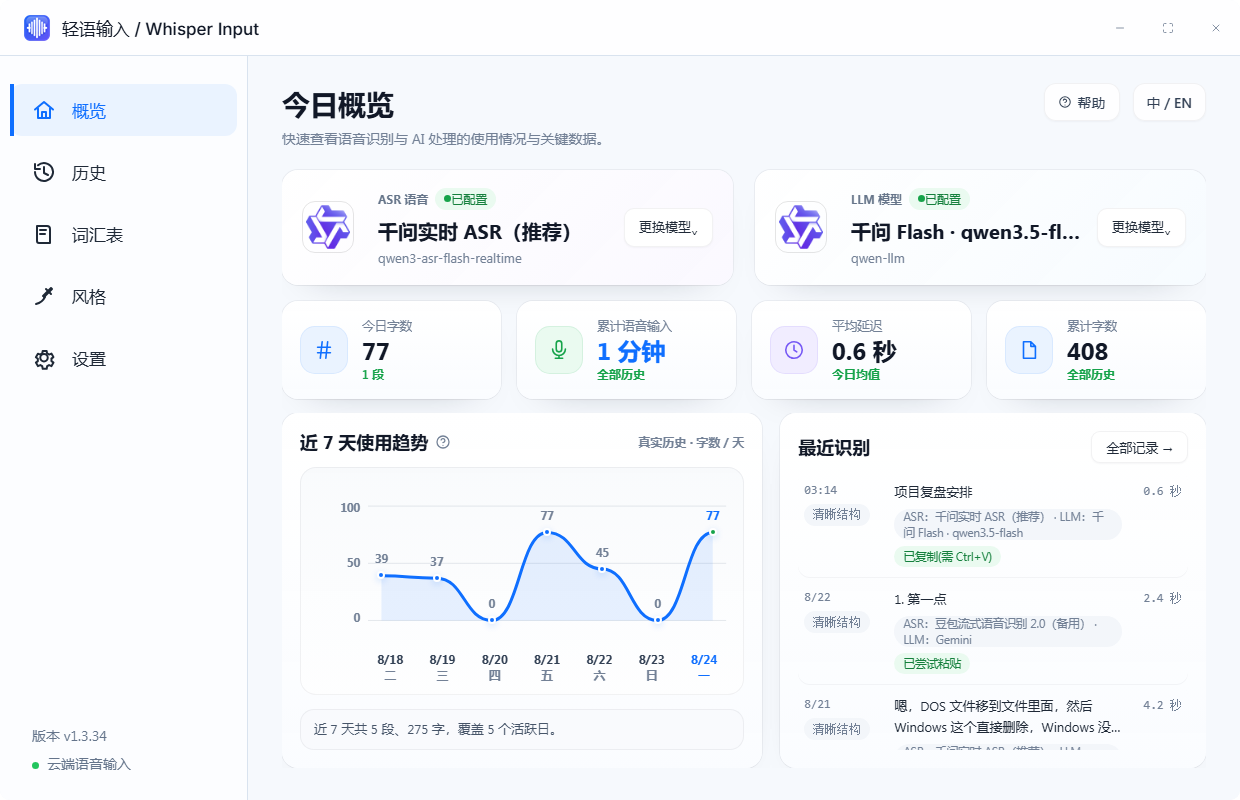
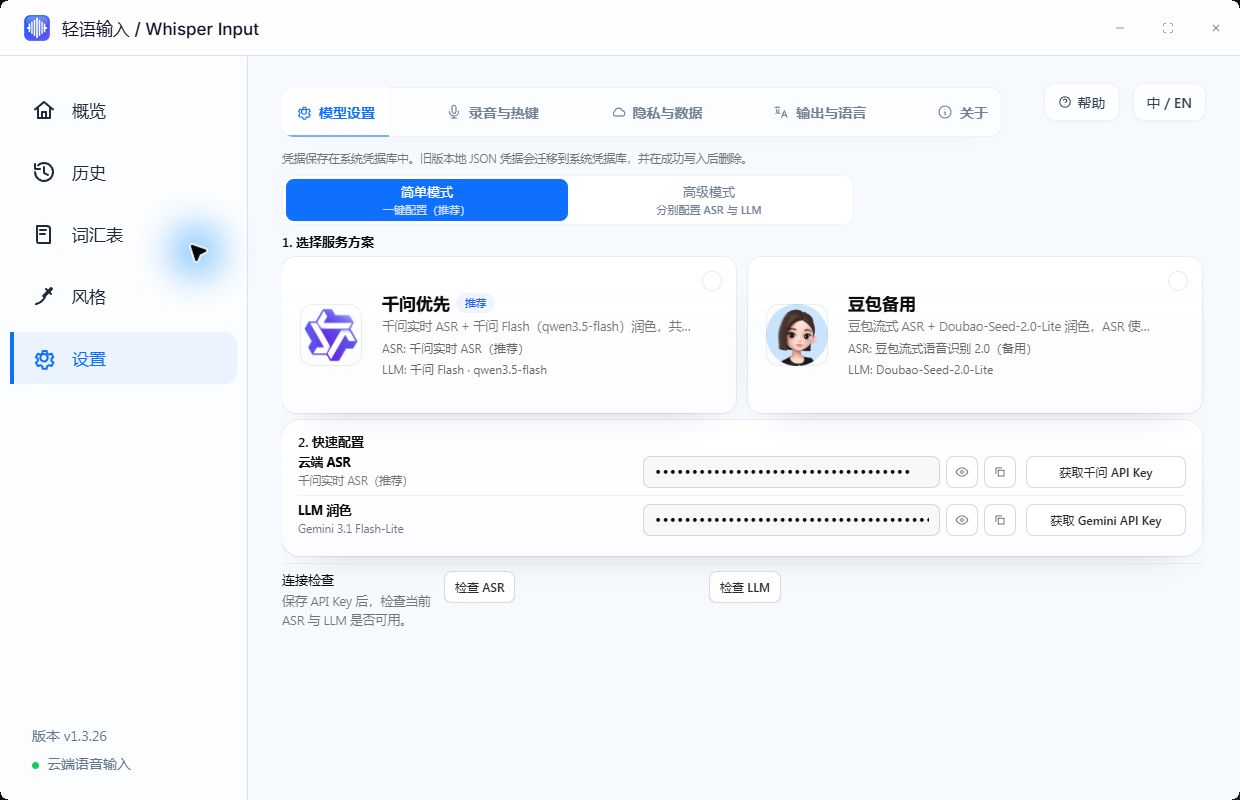
REAL INTERFACE
四张真实界面,分别回答状态、风格、模型和隐私。
这些图片来自当前 GitHub README,不是重新绘制的概念稿。
REAL INTERFACE
Four real screens for status, output styles, models, and privacy.
Every image comes from the current GitHub README rather than a recreated concept mockup.
CORE CAPABILITIES
从说话到上屏,中间每一步都服务于“可用”。
适应中文为主、夹杂英文术语的工作口述。
停止说话后尽快识别、整理并插入。
把多个口语要点整理成层级或工作文稿。
用中文说清意思,直接生成英文邮件或 Issue。
保留人名、公司名、产品名与专业术语。
目标应用拒绝插入时,结果仍然可用。
CORE CAPABILITIES
Every step between speech and insertion is designed for usable output.
Handle Chinese-first speech with real work terminology.
Transcribe, polish, and insert soon after speech ends.
Turn spoken points into hierarchy or professional prose.
Speak the meaning in Chinese and output an English email or issue.
Preserve names, companies, products, and specialist terms.
Keep the result when the target app blocks direct insertion.
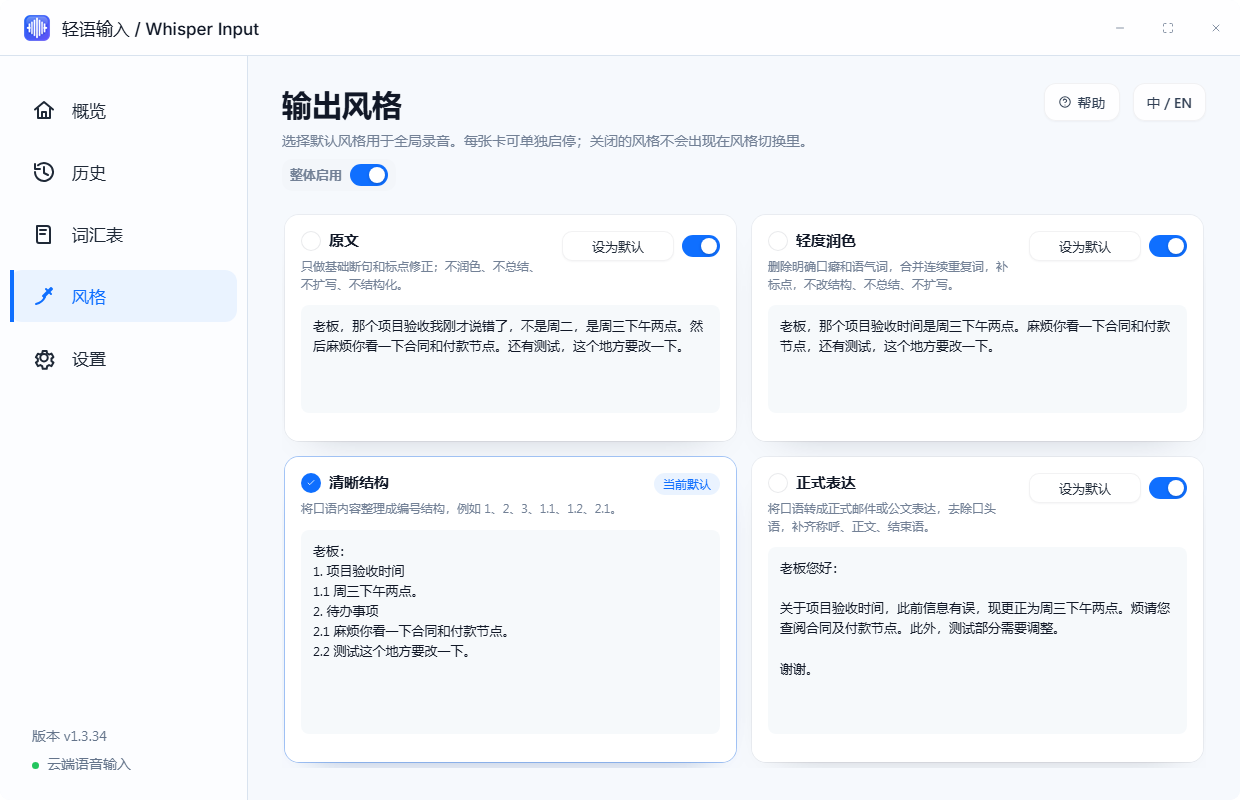
FOUR OUTPUT STYLES
同一段口述,按用途整理成四种结果。
| 风格 | 处理方式 |
|---|---|
| 原文 | 保留原始表达,只补充断句与标点 |
| 轻度润色 | 去掉口头语和重复词,保持原有顺序 |
| 清晰结构 | 把多个事项整理为 1、1.1、2 的层级文本 |
| 正式表达 | 转换为邮件、请示、反馈或交接说明 |
原始口述
第一把代码推上去,第二改 README,第三发安装包。
清晰结构
1. 推送代码
2. 更新 README
3. 发布安装包
FOUR OUTPUT STYLES
One spoken thought, organized for four different uses.
| Style | What it changes |
|---|---|
| Raw | Keep the original wording and add sentence breaks and punctuation |
| Light polish | Remove filler and repetition while preserving order |
| Clear structure | Turn multiple points into a numbered hierarchy |
| Formal | Rewrite as an email, request, report, or handoff note |
Spoken input
First push the code, second update the README, third publish the installer.
Clear structure
1. Push the code
2. Update the README
3. Publish the installer
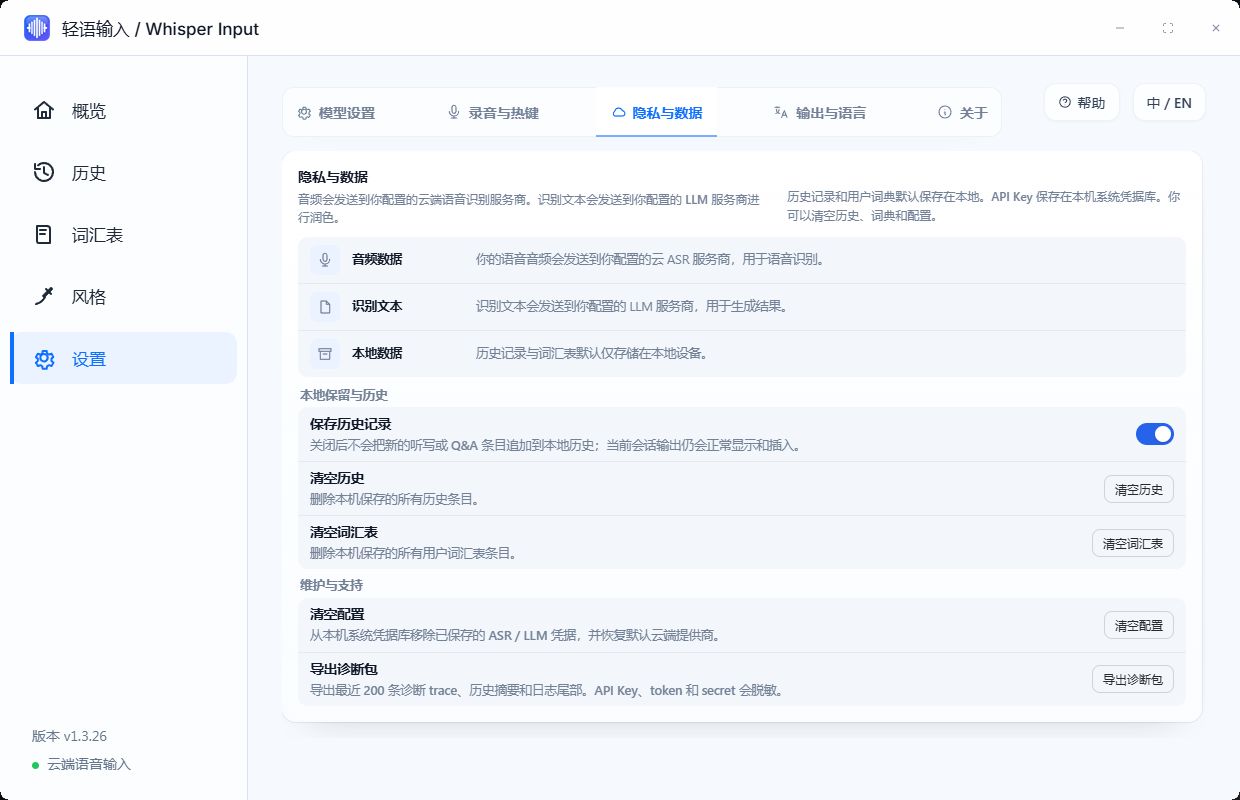
DATA AND PRIVACY
这是 cloud-first 产品,设置页会明确告诉你数据去了哪里。
| 数据 | 默认位置或去向 |
|---|---|
| 录音音频 | 发送到用户配置的云端 ASR 服务 |
| ASR 文本 | 发送到用户配置的 LLM 服务进行整理 |
| 历史记录 | 默认保存在本机,可清空 |
| 用户词典 | 默认保存在本机,可编辑或清空 |
| 云端服务凭据 | Windows Credential Manager,可清除 |
当前主线不是离线 ASR。使用前需要按界面配置语音识别和文字润色服务,并理解相应服务商的数据政策与费用。
DATA AND PRIVACY
This is cloud-first, and the settings page makes every data destination explicit.
| Data | Default location or destination |
|---|---|
| Recorded audio | User-configured cloud ASR service |
| ASR text | User-configured LLM for cleanup |
| History | Stored locally by default and removable |
| User dictionary | Stored locally and editable |
| Cloud credentials | Windows Credential Manager and removable |
The current product is not offline-first ASR. Users configure speech and language services and remain responsible for provider policies and cost.
INSTALL AND USE
安装后只需要完成模型设置,就可以在任意输入位置开始说话。
- 从 GitHub Releases 下载最新版 Windows 安装包。
- 安装并启动轻语输入,进入“设置 - 模型设置”。
- 选择千问或豆包等 ASR,并配置一个文字润色模型。
- 设置全局快捷键和输出风格。
- 回到任意输入框,按快捷键开始口述。
INSTALL AND USE
After model setup, start speaking from any input field.
- Download the latest Windows installer from GitHub Releases.
- Install and open Whisper Input, then visit Model Settings.
- Choose an ASR provider and configure a model for text cleanup.
- Set the global shortcut and output style.
- Return to any input field and press the shortcut to speak.
PRODUCT BOUNDARIES
保持输入工具的定位,刻意不把它做成一套大平台。
- 不注册 Windows 系统输入法,不接管系统 IME。
- 不做会议记录平台,专注短到中长文本输入。
- 不主动生成用户没有说过的信息。
- 不加入 RAG 或 Agent 工作流,保持输入链路轻量。
- 当前主线以真实可用的云端 ASR 为主,不宣传离线优先。
PRODUCT BOUNDARIES
Stay focused as an input tool instead of becoming a large platform.
- It does not register as a Windows system IME.
- It is not a meeting-recording platform.
- It does not invent information the user did not say.
- It does not add RAG or agent workflows to the input path.
- The current product uses practical cloud ASR rather than claiming offline-first operation.
FREQUENTLY ASKED QUESTIONS
常见问题与核心特性答疑
Whisper Input 与讯飞等商业语音输入法相比有什么优势?
零捆绑与无后台常驻,纯净无广告;AI 智能重写与口语整理,自动去除语气词(“嗯、啊、那个”)、整理语序;模型自由切换,支持配置千问、豆包等高精度 ASR 与多种 LLM 润色模型,不按年收取高昂会员费。
它能在哪些软件里输入?如何使用?
支持 Windows 全局任意激活窗口(微信、Word、VS Code、浏览器、Obsidian 等)。按下设定快捷键即可说话,松开后自动模拟按键输入到当前光标处;若目标窗口拦截输入,自动复制到剪贴板兜底。
口述隐私如何保障?录音和文字会泄露吗?
轻语输入不设私有云端中转服务器,音频与文字仅直接发送给用户自己配置的 ASR/LLM 服务商(如阿里云千问、火山引擎豆包等)。历史记录与个人词典默认仅保留在本机,且提供一键清空与凭据管理。
FREQUENTLY ASKED QUESTIONS
Frequently Asked Questions
What makes Whisper Input different from commercial voice typing tools?
Zero bloatware and background processes, strictly ad-free; smart AI text cleanup that removes verbal fillers ("um", "uh") and organizes spoken thoughts; flexible model choice supporting Qwen, Doubao ASR, and custom LLMs without recurring subscription fees.
Which applications are supported and how does it work?
It works across all active Windows windows (WeChat, Word, VS Code, browsers, Obsidian, etc.). Hold the shortcut to speak, and on release it types directly into the cursor location. If insertion is blocked, it automatically falls back to copying to the clipboard.
How is voice and text privacy protected?
Whisper Input has no proprietary cloud server. Audio and text are sent directly to your configured ASR/LLM providers (e.g. Alibaba Qwen, ByteDance Doubao). Local speech history and dictionaries remain on your device with one-click cleanup and credential management.
OPEN SOURCE
下载后,先用自己的真实表达试一次。
此页依据当前 README 整理,同步至 2026-08-30。模型支持、配置方式和安装资产以 GitHub 最新 Release 为准。
OPEN SOURCE
Download it and try one piece of your own real speech.
This page is adapted from the current README and synced on August 30, 2026. GitHub remains the source of truth for models, configuration, and release assets.