
THE PROBLEM
报销真正耗时的,是在邮件、附件、文件夹和表格之间反复搬运。
InvoiceFlowAI 面向每月需要手工收集多张电子发票的个人、自由职业者和小团队。它把收集、识别、归档和汇总放进一次处理,同时把无法可靠确认的材料单独交给人复核。
这不是会计或税务判断工具。软件只帮助准备材料,发票字段、报销、税务和合规结果都必须由用户最终核验。
THE PROBLEM
Reimbursement becomes slow when every invoice moves across email, folders, and spreadsheets by hand.
InvoiceFlowAI is for individuals, freelancers, and small teams that collect many electronic invoices each month. It combines collection, extraction, archiving, and reporting while isolating uncertain documents for manual review.
This is not an accounting or tax decision tool. Users must verify every extracted field and all reimbursement, tax, and compliance results.
PROCESSING FLOW
先筛选,再识别;先确认,再归档。
- 只读连接 QQ 或 163 邮箱按时间范围批量读取邮件与附件,不发送、删除或修改邮件。
- 经过四层筛选漏斗按域名、主题、正文与二维码线索排除非发票邮件。
- 提取附件与下载链接处理 PDF、OFD、XML、递归 ZIP,以及部分平台下载页。
- OCR、视觉识别与本地兜底按结果选择 OCR 流、视觉流或本地规则。
- 分类、重命名与凭证撮合将住宿发票与水单、打车发票与行程单相邻归档。
- 生成 Excel 汇总输出发票清单和金额汇总,低置信度材料进入待人工复核。
PROCESSING FLOW
Filter before extraction; verify before archiving.
- Connect a QQ or 163 mailbox read-onlyRead messages and attachments by date without sending, deleting, or modifying email.
- Apply a four-stage filterUse domain, subject, body, and QR signals to exclude non-invoice mail.
- Extract files and supported linksProcess PDF, OFD, XML, recursive ZIP, and selected download pages.
- Use OCR, vision, and local fallbackRoute each document through the most appropriate extraction path.
- Classify and pair supporting documentsKeep hotel invoices beside folios and ride invoices beside itineraries.
- Build the Excel reportSummarize invoices and amounts while sending uncertain items to manual review.
CORE CAPABILITIES
面对复杂发票来源,不把一次失败当作最终结果。
读取 PDF、OFD、XML、ZIP 和支持的发票链接。
OCR 精确流与视觉降级流自动切换。
处理百望云及部分税务平台下载页面。
可以表达金额、来源与目录归档规则。
识别一组报销材料并保持相邻命名。
生成完整清单与金额汇总,便于继续核对。
CORE CAPABILITIES
One failed extraction path does not become the final result.
Collect PDF, OFD, XML, ZIP, and supported invoice links.
Switch between OCR-first and visual fallback paths.
Handle Baiwang Cloud and selected tax-platform download pages.
Describe amount, source, and destination rules in plain language.
Keep related invoices and supporting documents together.
Create a reviewable item list and amount summary.
REAL PRODUCT PROOF
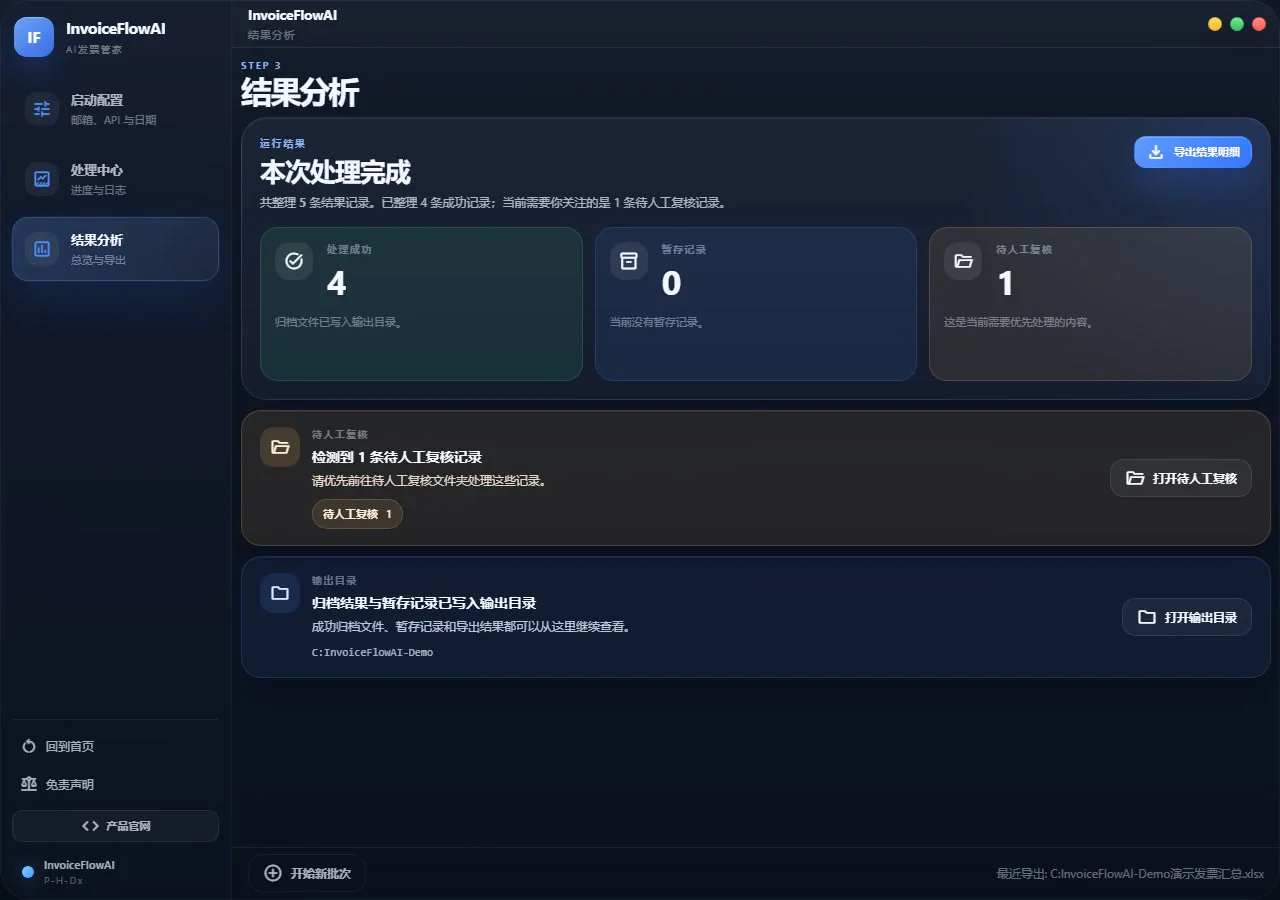
从启动配置到结果分析,完整展示真实桌面版。
录屏使用演示邮箱与演示公司数据,不包含真实个人发票或凭据。
REAL PRODUCT PROOF
The real desktop flow from setup to result analysis.
The recording uses demonstration mailbox and company data, with no personal invoices or credentials.
EXTRACTION ARCHITECTURE
OCR、视觉识别和本地规则,组成三层识别防线。
| 路径 | 适用场景 |
|---|---|
| Track A:OCR + LLM | 先提取文字结构再理解,适合多数标准票据 |
| Track B:视觉模型 | 直接读取复杂排版或图片型发票 |
| Local Fallback | 使用本地规则处理已知字段,离线且不产生 API 消耗 |
| Manual Check | 置信度不足、加密或异常材料,保留给用户人工处理 |
系统不会对每封邮件直接调用 AI,而是先筛除明显无关的邮件和装饰附件,减少误识别和费用。
EXTRACTION ARCHITECTURE
OCR, visual extraction, and local rules form three lines of defense.
| Path | Best fit |
|---|---|
| Track A: OCR + LLM | Extract structured text first for most standard documents |
| Track B: vision model | Read complex layouts and image-only invoices directly |
| Local fallback | Handle known fields offline without API cost |
| Manual check | Keep uncertain, encrypted, or unusual documents for the user |
The system filters obvious non-invoice mail and decorative attachments before calling an AI service.
PRIVACY AND SECURITY
邮件与归档留在本机;模型只接收识别所需的发票内容。
| 数据 | 处理方式 |
|---|---|
| 邮件与发票文件 | 本地读取、下载、分类与归档 |
| 邮箱授权码 | Windows 使用 DPAPI;macOS 使用 Keychain |
| GLM 请求 | 仅发送用于识别的发票图片,不发送邮件原文 |
| 邮箱权限 | 通过 IMAP 只读访问,不修改邮箱内容 |
启用 GLM OCR 或视觉识别时,发票图片会发送至用户配置的智谱 AI 服务并受其隐私政策约束。
PRIVACY AND SECURITY
Email and archives stay local; the model receives only invoice content needed for extraction.
| Data | Handling |
|---|---|
| Email and invoice files | Read, download, classify, and archive locally |
| Mailbox authorization code | Windows DPAPI or macOS Keychain |
| GLM request | Invoice images only; email body text is not sent |
| Mailbox access | Read-only IMAP with no mailbox modification |
When GLM OCR or vision is enabled, invoice images are sent to the user-configured Zhipu AI service under that provider's privacy policy.
INSTALL AND USE
首次配置一次,之后按时间范围直接扫描。
- 从 GitHub Releases 下载 Windows 安装版、免安装版,或 Apple Silicon Mac DMG。
- 在 QQ 或 163 邮箱开启 IMAP,并生成独立授权码;不要填写邮箱登录密码。
- 配置智谱 GLM API Key,选择输出目录和扫描日期。
- 运行扫描,最后检查 Excel 汇总与“待人工复核”目录。
适合完整批量处理与本地归档。
在 Harness 右侧边栏提供本地下载、OCR、归档和汇总入口。
INSTALL AND USE
Configure once, then scan a chosen date range.
- Download the Windows installer, portable package, or Apple Silicon Mac DMG from Releases.
- Enable IMAP on QQ or 163 Mail and generate an authorization code; do not use the mailbox password.
- Configure a Zhipu GLM API key, output folder, and date range.
- Run the scan, then review the Excel report and manual-check folder.
Best for complete batch processing and local archiving.
Adds local download, OCR, archiving, and reporting to the Harness sidebar.
CURRENT BOUNDARIES
自动整理减少搬运,不取消最后的人工核验。
- 图片模糊、非标准票据或加密 PDF 可能进入待人工复核。
- 发票字段与金额可能识别错误,Excel 汇总不是会计结论。
- 用户需要合法拥有所连接邮箱的访问权。
- 第三方邮箱、OCR 和视觉模型服务的可用性与政策不由本项目控制。
CURRENT BOUNDARIES
Automation reduces handling; it does not remove final verification.
- Blurred, unusual, or encrypted documents may require manual review.
- Extracted fields and amounts can be wrong; the Excel file is not an accounting conclusion.
- The user must have lawful access to the connected mailbox.
- Availability and policies of email, OCR, and vision providers are outside the project's control.
FREQUENTLY ASKED QUESTIONS
常见问题与核心特性答疑
为什么选择 InvoiceFlowAI 而不是网页版发票管理系统?
隐私与安全性是首要考量。发票包含纳税人识别号、购买明细、银行账号等高度敏感财务隐私。InvoiceFlowAI 是一款纯本地运行的桌面工具,直接在本地解析 PDF 与邮件附件,绝不把用户发票数据上传到任何第三方商业服务器。
支持哪些类型的发票和邮箱协议?
支持国内常见的增值税电子普通发票、专用发票、全电发票(PDF 及 OFD 格式)。支持标准 IMAP 协议(QQ 邮箱、网易 163 邮箱、企业微信邮箱、Gmail、Outlook 等)。
它是如何防止重复发票报销的?
系统会读取每张发票的核心唯一字段(如发票代码与发票号码),并在本地数据库中进行全局比对去重。即使同一张发票在多封邮件中被重复发送,也只会入库和汇总一次,并在报表中进行标注提示。
FREQUENTLY ASKED QUESTIONS
Frequently Asked Questions
Why choose InvoiceFlowAI over hosted online invoice tools?
Privacy is the top concern. Invoices carry sensitive financial details like tax IDs, purchased items, and bank details. InvoiceFlowAI runs completely on your local machine, parsing PDFs and attachments without transmitting private receipts to third-party clouds.
Which invoice formats and email protocols are supported?
It supports standard VAT electronic normal, special, and fully digitalized invoices (in PDF and OFD). It works with standard IMAP mailboxes including QQ Mail, NetEase 163, Enterprise WeChat, Gmail, and Outlook.
How does deduplication work to prevent duplicate claims?
The extractor indexes unique invoice codes and numbers in a local database. Duplicate attachments from forwarded or repeated emails are deduplicated automatically, with clear audit flags in the final Excel report.
OPEN SOURCE
先用演示流程理解边界,再处理自己的发票。
此页依据当前 README 整理,同步至 2026-08-30。安装、邮箱配置、隐私说明和免责声明以 GitHub 原文为准。
OPEN SOURCE
Understand the demonstrated flow and its boundaries before using personal invoices.
This page is adapted from the current README and synced on August 30, 2026. GitHub remains the source of truth for installation, privacy, and disclaimers.